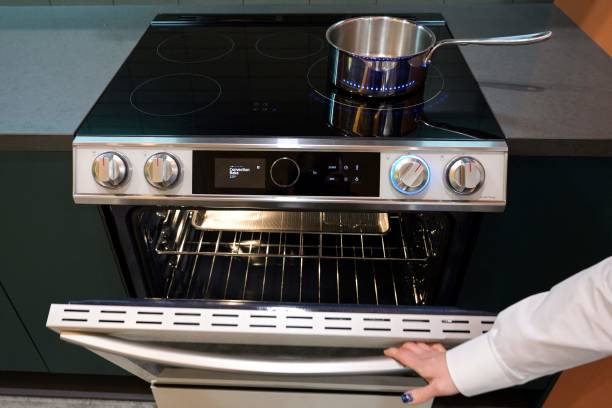
How To Steam Clean A Samsung Oven
In this guide we’ll walk you through setting the right temperature, adding water, and timing the cycle so you get a sparkling interior without harsh chemicals. You’ll learn the exact button sequence, safety tips, and how to finish with a quick wipe, ensuring a fresh‑smelling oven in minutes. Ready to make cleaning effortless? Let’s begin.
Understanding Steam Cleaning Technology
How Steam Cleaning Works
Steam cleaning uses high‑temperature water vapor to loosen and dissolve food residue without harsh chemicals. First, fill the oven’s built‑in water reservoir or a detachable tray with clean tap water, then select the steam‑clean function on the Samsung control panel.
The oven heats the water to around 212 °F (100 °C), generating pressurized steam that circulates through the cavity for the programmed duration, typically 20‑30 minutes.
As the steam penetrates grease and baked‑on splatters, the heat softens the particles, turning them into a thin film that can be wiped away with a soft cloth. Because the process is enclosed, there is minimal moisture escape, protecting surrounding cabinets.
After the cycle ends, allow the oven to cool for a few minutes, then simply wipe the interior with a damp microfiber towel to remove the loosened debris, leaving a fresh, streak‑free surface.
Benefits for Samsung Ovens
Samsung ovens integrate steam cleaning as a native feature, offering several practical advantages over manual scrubbing. The high‑temperature steam penetrates hard‑to‑reach corners and the heating elements, breaking down stubborn caramelized sugars and oil without damaging the enamel coating.
Because the system uses only water, there are no residue‑leaving chemicals, making it safe for food‑preparation surfaces and ideal for households with allergies. The automated cycle also saves time; a typical 25‑minute program replaces a 30‑minute to an hour of elbow‑grease effort, freeing you to prepare other dishes.
Energy consumption is modest, as the oven already heats for cooking, so the additional steam phase adds only a small increment to the overall power use, thereby reducing the risk of cracks or warping in the door glass and metal components, thereby extending the appliance’s lifespan significantly.
Differences from Traditional Cleaning
Traditional oven cleaning relies on abrasive scrubs, chemical degreasers, or self‑cleaning pyrolysis cycles, each with distinct drawbacks compared to Samsung’s steam mode. Abrasive tools can scratch the enamel surface, while harsh chemicals may leave residues that affect food flavor and pose health concerns.
Pyrolytic self‑cleaning heats the cavity to 900 °F (482 °C) for hours, consuming considerable electricity and producing strong odors; it also cannot reach the lower rack and door gasket as effectively as steam.
In contrast, steam cleaning operates at a much lower temperature (around 212 °F) and uses water vapor to soften grime, preserving the oven’s finish and eliminating chemical exposure. The steam cycle is shorter—typically 20‑30 minutes—so it fits better into busy cooking schedules.
Moreover, because steam condenses on surfaces, it leaves a moist environment that can be easily wiped dry, resulting in a spotless interior without the lingering smoke or burnt smells of pyrolysis.
Preparing Your Samsung Oven for Steam Cleaning
Removing Racks and Accessories
Begin by turning off the oven and allowing it to cool completely. Remove all racks, trays, and accessories such as pizza stones or grill pans, placing them on a countertop. Inspect each piece for stubborn residue; if needed, soak them in warm, soapy water while you prepare the steam cycle.
Do not leave any metal parts inside during the cleaning process, as they can block steam flow and cause uneven results. Store the removed items safely away from the oven door to prevent accidental re‑placement.
Once everything is cleared, wipe the interior with a damp cloth to eliminate loose crumbs, which helps the steam reach all surfaces more effectively. This step ensures the steam can circulate freely, maximizing its cleaning power and reducing the need for additional manual scrubbing later.
After the steam cycle finishes, let the oven cool before re‑installing the racks, and you’ll notice a sparkling interior ready for the next bake.
Checking Water Reservoir Capacity
Locate the built‑in water reservoir, usually found behind the oven door or under the lower panel. Consult the user manual to confirm the exact capacity, which typically ranges from 300 ml to 500 ml for most Samsung models.
Before starting the steam clean, remove the reservoir cover and fill it with clean, lukewarm tap water up to the indicated maximum line; overfilling can cause leaks and interrupt the cycle.
If your oven features a detachable tank, detach it carefully, pour out any leftover water, and then refill it to avoid mixing old residue with fresh steam. Do not use boiling water, as excessive heat may damage the internal seals.
After filling, securely reattach the cover, ensuring it clicks into place. A properly filled reservoir guarantees sufficient steam generation, allowing the oven to maintain the recommended temperature of around 100 °C for the full cleaning duration, which maximizes grime dissolution without manual effort.
Safety Precautions
Before initiating the steam cleaning cycle, make sure the oven is completely unplugged or switched off at the mains to prevent accidental activation. Keep children and pets away from the kitchen area, as the steam can reach temperatures of up to 120 °C and cause burns.
Wear heat‑resistant gloves when handling the water reservoir or opening the door during the cycle, and avoid standing directly in front of the oven vent where hot vapor exits.
Ensure the surrounding countertops are clear of flammable items such as paper towels or cleaning solvents, which could ignite if they come into contact with steam. If you notice any unusual noises, leaks, or a persistent foul odor, stop the program immediately and consult the Samsung support guide.
Finally, after the cycle ends, allow the interior to cool for at least ten minutes before wiping down any residual moisture, ensuring the oven is safe to use for the next cooking session.
Step-by-Step Steam Cleaning Process

Adding Water to the Reservoir
Begin by ensuring the oven is completely cool and unplugged for safety. Open the oven door and locate the built‑in water reservoir, usually found at the back wall or beneath the oven floor.
Remove the cap and fill the reservoir with clean, room‑temperature water up to the marked max line—typically 250 ml for most Samsung models. Avoid using hot water or adding detergents, as they can interfere with the steam generation and damage internal components.
After filling, securely replace the cap to prevent leaks, then close the door gently. Double‑check that the reservoir is seated correctly; a misaligned cap can trigger error codes during the cycle.
Once the water is in place, you’re ready to activate the steam clean function, which will use this water to produce the necessary steam for loosening baked‑on residue.
Selecting the Steam Clean Program
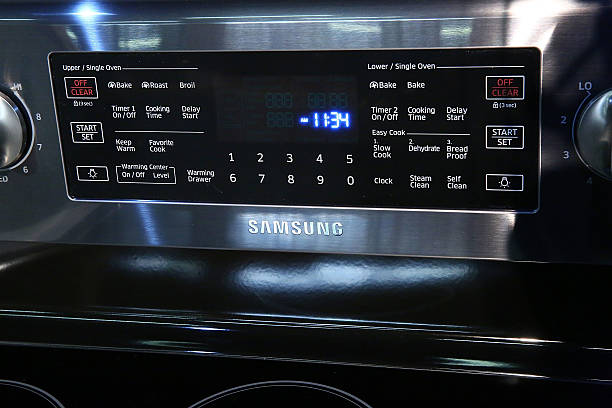
With the reservoir filled, turn the oven back on and press the Power button to wake the control panel. Navigate to the main menu using the rotary knob or touch interface, then scroll to the Steam Clean icon—often depicted as a droplet inside a rectangle.
Select this option and confirm by pressing Start; on many Samsung ovens you can also adjust the steam temperature between 100 °C and 120 °C to match the level of grime.
If your model offers a pre‑heat setting, enable it to warm the interior slightly before steam generation, which helps break down stubborn stains faster. Review the on‑screen summary to ensure the correct water level and temperature are displayed, then press Confirm to launch the cycle.
The oven will begin emitting steam within a minute, filling the cavity with moist heat that softens residue without harsh chemicals.
Monitoring the Cycle Duration
After starting the steam clean, keep an eye on the cycle timer displayed on the oven’s digital panel. Most Samsung models run for 20‑30 minutes, but the exact duration will appear as a countdown, allowing you to gauge progress.
Do not open the oven door during this period, as releasing steam prematurely can reduce cleaning effectiveness and pose a burn risk. If you notice excessive condensation on the exterior, gently wipe it with a dry cloth, but avoid interfering with the internal process.
When the timer reaches zero, the oven will automatically shut off and the steam will dissipate; wait an additional five minutes before opening the door to let residual moisture evaporate.
Finally, use a soft, damp cloth to wipe away loosened food particles, then dry the interior with a clean towel for a sparkling finish.
Post-Cleaning Maintenance Tips
Wiping Down Interior Surfaces
After the steam cycle finishes, allow the oven to cool for about ten minutes before you begin any wiping. Use a soft, lint‑free cloth or a non‑abrasive sponge dampened with warm water and a few drops of mild dish soap.
Wipe all interior walls, the ceiling, and the floor in long, overlapping strokes to lift any loosened grime. Pay special attention to the door gasket and the corners where residue can accumulate. Rinse the cloth frequently to avoid spreading dirt back onto the surface.
Once the visible debris is removed, go over the interior once more with a clean, damp cloth to eliminate any soap film. Dry the interior with a dry microfiber towel to prevent water spots and to ensure the next cooking cycle starts with a dry environment.
Finally, leave the oven door slightly ajar for 5‑10 minutes to allow any remaining moisture to evaporate completely.
Cleaning the Water Reservoir
First, locate the water reservoir at the back of the oven cavity; it is usually a removable plastic tray or a sealed compartment. Pull the reservoir out gently, being careful not to spill any remaining water.
Rinse the reservoir with warm water to clear out loose mineral deposits, then fill a bowl with equal parts white vinegar and water. Submerge the reservoir (or place a soft brush inside) and let it soak for five to ten minutes. This solution breaks down limescale and prevents future buildup.
After soaking, scrub the interior with a soft‑bristled brush, focusing on corners and the inlet nozzle. Rinse thoroughly with clean water until no vinegar smell remains. Dry the reservoir with a lint‑free cloth, ensuring it is completely moisture‑free before reinstalling.
Finally, slide the reservoir back into its slot, making sure it seats securely so the steam generator can operate without leaks.
Reinstalling Racks Properly
Before you put the racks back, make sure they are completely dry; any residual moisture can cause steam to collect and create uneven heating. Wipe each rack with a clean, dry towel and inspect for any remaining food particles or soap residue.
If you notice stubborn spots, give them a quick rinse with warm water and dry again. When reinstalling, slide each rack into its designated guide rail, ensuring it sits flat and is fully supported by the brackets.
Align the front edge of the rack with the oven’s front lip to prevent it from shifting during use. For optimal airflow, avoid overcrowding the oven; leave at least an inch of space between the rack and the heating elements.
Check that the racks are stable by gently pushing them; they should not wobble. Properly positioned racks not only improve cleaning efficiency but also promote even cooking results.
Troubleshooting Common Issues
Steam Not Generating
If your Samsung oven isn’t producing steam during the clean cycle, first verify that the water reservoir is seated correctly. Check the reservoir placement – pull it out, fill it with cold tap water up to the marked line, and re‑insert it until you hear a click.
Next, inspect the door seal for any debris or damage; a compromised seal can prevent the steam pump from building pressure. Clean the seal with a soft cloth and mild detergent, then dry thoroughly.
After reseating the reservoir, run a short 5‑minute test cycle; if steam still fails to appear, reset the oven by turning off power at the circuit breaker for 2 minutes, then restore power.
Finally, if the problem persists, the steam generator pump may be clogged or faulty – contact Samsung support or a qualified technician for pump inspection and replacement.
Excessive Moisture Inside Oven
When steam cleaning leaves too much moisture, food can become soggy and the oven may take hours to dry. Vent the oven immediately after the cycle finishes by opening the door 2‑3 minutes to allow humid air to escape.
Then, locate the built‑in drying fan (often behind the lower oven panel) and run it on high for 5‑10 minutes; if your model lacks a fan, set the oven to the lowest convection setting for 10 minutes with the door ajar.
Wipe the interior walls, racks, and the bottom drip tray with a lint‑free cloth to remove pooled water – dry surfaces prevent rust and odor. To speed up drying, place a rolled kitchen towel on the floor of the oven; it will absorb excess liquid.
Finally, schedule a regular maintenance check of the water‑drain channel; clearing any blockage ensures future steam cycles expel moisture efficiently.
Error Codes Related to Steam Clean
Samsung ovens display specific error codes when the steam system detects a fault. Code “SE” indicates the steam generator isn’t heating; verify the water level and ensure the reservoir is properly seated, then reset the appliance by unplugging it for 1 minute.
Code “SC” points to a sensor malfunction – clean the interior humidity sensor (usually a small metal plate near the back wall) with a soft brush and dry it before restarting.
If the code persists, perform a factory reset: press and hold the “Clean” and “Power” buttons simultaneously for 5 seconds, then release.
Code “E5” often appears when the drain pump is blocked; locate the pump access panel at the bottom of the oven, remove any debris, and run a short rinse cycle.
Should any of these steps fail to clear the code, contact Samsung technical support for a possible firmware update or component replacement.
Frequently Asked Questions (FAQ)
Can I Use Vinegar in Steam Cleaning?
Yes, you can incorporate a small amount of white vinegar into the steam‑clean cycle of a Samsung oven, but it should be used cautiously. Add only 1‑2 tablespoons of vinegar to the water reservoir, then select the steam‑clean function.
The acidity helps break down stubborn grease while the steam softens residue, making it easier to wipe away. Avoid pouring vinegar directly onto heating elements or the oven interior, as excess liquid can seep into electronic components.
After the cycle finishes, let the oven cool for a few minutes, then wipe the interior with a soft, damp cloth. For best results, rinse the cloth with plain water to remove any lingering vinegar smell.
Remember to check your user manual; some Samsung models recommend plain water only, and using vinegar could void the warranty. When in doubt, stick to the manufacturer’s guidelines.
How Often Should I Steam Clean?
The frequency of steam cleaning a Samsung oven depends on how often you cook and the types of dishes you prepare. For light use—once a month—a quick 10‑minute steam cycle will keep residue from building up.
If you bake frequently, especially with sugary or greasy foods, aim for a steam clean every two weeks to prevent caramelized layers from hardening on the walls. After any major spill or splatter, run a short steam session immediately to dissolve the mess before it solidifies.
Keep an eye on the oven’s interior; a thin film of steam‑condensed water that dries into a film indicates it’s time for another cycle. Always follow the manufacturer’s recommendation in the user guide, as some models have a built‑in reminder.
By establishing a regular schedule, you reduce the need for harsh chemicals and extend the lifespan of the oven’s finish.
Is Steam Cleaning Safe for Self-Cleaning Ovens?
Steam cleaning and the self‑cleaning function are two distinct cleaning methods, and they can coexist safely if used correctly on a Samsung oven.
Do not run a steam cycle immediately before or after a self‑clean cycle, because the high‑temperature pyrolytic process can cause excess moisture to condense and potentially affect electronic controls.
Instead, schedule steam cleaning on days when you are not planning a self‑clean, allowing the interior to dry completely for at least an hour. The steam function uses temperatures around 120‑130 °C, far lower than the 500 °C of a self‑clean, so it won’t damage the enamel coating.
However, repeated exposure to water vapor can loosen seals over time, so inspect the door gasket regularly and replace it if it shows wear. Following the manufacturer’s guidelines ensures that both cleaning options remain effective without compromising safety or warranty coverage.
Expert Recommendations and Best Practices
Using Manufacturer-Approved Accessories
Start by consulting your Samsung oven’s user manual to locate the recommended steam‑clean accessory, usually a detachable water reservoir or a dedicated steam tray. Fill the reservoir with cold tap water up to the marked line, avoiding any additives that could damage internal components.
Insert the tray securely, then close the oven door and select the “Steam Clean” program from the control panel. The cycle typically runs for 20‑30 minutes, during which the oven generates a fine mist that loosens grease and food residue without harsh chemicals.
Allow the oven to cool completely before opening the door; this prevents steam burns and lets the moisture settle. After the cycle, wipe the interior with a soft, damp cloth to remove any remaining particles.
Using only Samsung‑approved accessories ensures optimal performance, protects the warranty, and reduces the risk of electrical or corrosion issues.
Combining Steam Clean with Regular Wipe-Downs
While steam cleaning tackles baked‑on grime, a routine of quick wipe‑downs keeps the oven interior sparkling between deep cycles. After each use, let the oven cool for 5‑10 minutes, then open the door to release residual steam.
Use a non‑abrasive microfiber cloth lightly dampened with warm water and a few drops of mild dish soap to wipe the walls, racks, and door seal. Focus on high‑traffic zones such as the bottom of the cavity and the oven light housing, where splatters accumulate fastest.
Rinse the cloth frequently to avoid redistributing grease, and dry surfaces with a clean towel to prevent moisture spots. Schedule a full steam‑clean session every 4‑6 weeks, depending on cooking frequency, to complement these light clean‑ups.
This hybrid approach extends the life of the heating elements, minimizes stubborn buildup, and maintains consistent cooking performance without excessive chemical exposure.
When to Call Professional Service
If steam cleaning fails to remove persistent stains or you notice abnormal noises, odors, or error codes, it’s time to involve a qualified technician. Do not attempt to disassemble the steam generator, heating element, or control board yourself, as improper handling can void the warranty and create safety hazards.
Document the issue by taking photos of any residue, noting the cycle duration, and recording the exact error message displayed on the panel. Contact Samsung’s authorized service network and provide this information; they can schedule an on‑site inspection and determine whether a component replacement or firmware update is required.
In cases of water leakage around the door gasket or excessive condensation inside the cavity, a professional can reseal the gasket and adjust ventilation settings to prevent future damage. Prompt professional intervention protects the oven’s efficiency, avoids costly DIY repairs, and ensures the appliance continues to meet its performance specifications.
Frequently Asked Questions
What is steam cleaning and does it work for Samsung ovens?
Steam cleaning uses hot water vapor to loosen food residue without harsh chemicals. Samsung ovens with a steam cleaning feature are designed to handle this method safely and effectively.
How do I prepare my Samsung oven for steam cleaning?
Remove all racks, trays, and accessories, then wipe away loose debris. Ensure the oven door is closed and the interior is dry before starting the steam cycle.
What are the step‑by‑step instructions to steam clean a Samsung oven?
1. Press the ‘Steam Clean’ button on the control panel. 2. Select the desired cleaning duration (usually 10‑20 minutes). 3. Press ‘Start’ and let the oven generate steam. 4. After the cycle ends, open the door and wipe the interior with a soft cloth.
Do I need to add water manually for the steam clean function?
Most Samsung models have a built-in water reservoir that you fill before initiating the cycle. Refer to your user manual to locate the reservoir, fill it with clean tap water, and replace the cover securely.
Can I use the steam clean feature for heavy, baked‑on stains?
Steam cleaning works best for light to moderate residue. For stubborn, baked‑on stains, let the steam cycle run longer, then gently scrub with a non‑abrasive sponge after the oven cools.
Are there safety precautions I should follow while steam cleaning?
Never open the oven door during the steam cycle, as hot steam can cause burns. Keep children and pets away from the kitchen, and ensure the ventilation hood is on to disperse moisture.
Conclusion
Remember to use the correct steam setting, keep the door sealed, and repeat monthly for best results. Give it a try and enjoy a fresher, more efficient Samsung oven today.
