Comparison: Best Stock 75 Keyboard (Updated | Aug 5th)
Are your fingers craving a more comfortable typing experience without sacrificing desk real estate? The 75% keyboard might be your perfect match, striking that sweet spot between compactness and functionality. In this guide, we’ll dive deep into the top contenders, comparing build quality, typing feel, and those all-important features to help you find the perfect board that will supercharge both your productivity and your gaming setup.
- Best for premium feature set: AULA F75 Pro Wireless Mechanical Keyboard
- Best for acoustic excellence: EPOMAKER x Aula F75 Gasket Mechanical Keyboard
- Best for thocky sound value: AULA F75 75% Wireless Mechanical Keyboard
- Best for creamy sound choice: YUNZII B75 PRO Wireless Mechanical Keyboard
- Best for quiet & stylish: Womier DK75 75% Wireless Gaming Keyboard
- Best for customization king: RK ROYAL KLUDGE R75 Wireless Mechanical Keyboard
- Best for wired creamy typist: RK ROYAL KLUDGE R75 Mechanical Keyboard Wired with Volume Knob
- Best for budget gaming pick: MageGee 75% Mechanical Gaming Keyboard
- Best for pro gamer’s choice: RedThunder K75 Wireless Mechanical Gaming Keyboard
- Best for cute & powerful: YUNZII C75 Wireless Mechanical Keyboard
Product Comparison: Best Stock 75 Keyboard
AULA F75 Pro Wireless Mechanical Keyboard,75% Hot Swappable Custom Keyboard with Knob,RGB Backlit,Pre-lubed Reaper Switches,Side Printed PBT Keycaps,2.4GHz/USB-C/BT5.0 Mechanical Gaming Keyboards

If you have been chasing that elusive “creamy” sound without wanting to spend hours modding, the AULA F75 Pro is a serious contender. What really makes it pop in a real-world setup is the combination of LEOBOG Reaper switches and the PCB single-key slotting. This isn’t just marketing fluff; the slotting allows the board to flex slightly with every stroke, which, when paired with the five layers of internal dampening, creates a deep, thocky acoustic profile that feels much more expensive than the price tag suggests. It’s a heavy, substantial board that stays planted on your desk during intense sessions.
I’d recommend this specifically for the “set it and forget it” enthusiast—someone who wants a custom-level experience right out of the box. It’s a fantastic daily driver for writers or gamers who appreciate a softer, more elastic typing feel. The tri-mode connectivity and 4000mAh battery make it a versatile pick for those switching between a PC and a tablet throughout the day.
The trade-off here is the side-printed keycaps. While they look incredibly sleek and clean from a top-down view, they can be a nightmare if you aren’t a confident touch typist. In low-light environments, even with the RGB lighting, finding specific function keys can be a struggle since the legends aren’t on top where you’d normally look.
EPOMAKER x Aula F75 Gasket Mechanical Keyboard, 75% Wireless Hot Swappable Gaming Keyboard with Five-Layer Padding&Knob, Bluetooth/2.4GHz/USB-C, RGB (Light Blue, LEOBOG Reaper Switch)

The EPOMAKER x Aula F75 is essentially the gold standard for what a budget-friendly gasket mount keyboard should be. What stands out most is the sheer attention to “acoustic mastery.” They’ve packed five layers of padding, including Poron foam and IXPE switch pads, into a compact frame. In a real room, this translates to a muted, refined sound that won’t annoy your coworkers or roommates, but still provides that satisfying tactile feedback. The Cherry profile double-shot PBT keycaps are a nice touch, offering a texture that resists that annoying oily shine after weeks of heavy use.
This is the ideal choice for a professional who moonlights as a gamer. It looks sophisticated in the Light Blue colorway and fits perfectly into a streamlined workspace. Because it supports full-key hot-swapping, it’s also a great “learner” board for someone who might want to experiment with different switches later on without buying a whole new deck.
However, the software experience can be a bit of a hurdle. While the hardware is top-tier, the driver used for remapping keys and customizing the RGB isn’t the most intuitive. If you like to frequently change your macros or lighting profiles, you might find the interface a bit clunky compared to more mainstream gaming brands.
AULA F75 75% Wireless Mechanical Keyboard, Hot Swappable Creamy Keyboard, Pre-lubed Reaper Switches, 2.4GHz/Type-C/BT5.0, RGB Backlit Gaming Keyboards(White & Blue)

The AULA F75 in White & Blue is a masterclass in aesthetic balance and internal engineering. What makes it stand out in a sea of 75% boards is the 1.2mm single-key slotted PCB. By cutting slots around each individual key, the board achieves a level of bounce and “softness” that traditional stiff PCBs can’t touch. When you’re typing a long report or gaming for hours, that extra bit of give significantly reduces finger fatigue. The pre-lubed Reaper switches are remarkably consistent, avoiding the scratchy feeling often found in stock mechanical keyboards.
I see this as the perfect “entry-level enthusiast” board. If you’ve been watching keyboard videos and want that specific “thocky” sound but don’t want to learn how to solder or lube switches yourself, this is your best bet. The multi-function knob is genuinely useful for toggling between office and gaming modes, making it a solid hybrid for students.
The main downside is the weight. This is a “thocky heavy” keyboard, and while that feels premium on a desk, it isn’t something you want to toss in a backpack every day. If you’re a digital nomad looking for something ultra-portable, the sheer bulk of the F75 might be a deterrent.
YUNZII B75 PRO Wireless Mechanical Keyboard,75% Layout with Knob,Hot Swap Gasket Structure,Creamy Pre-lubed Switches,RGB Backlit,Bluetooth/Type-C/2.4G for Win/Mac (Matcha Green, Milk Switch)
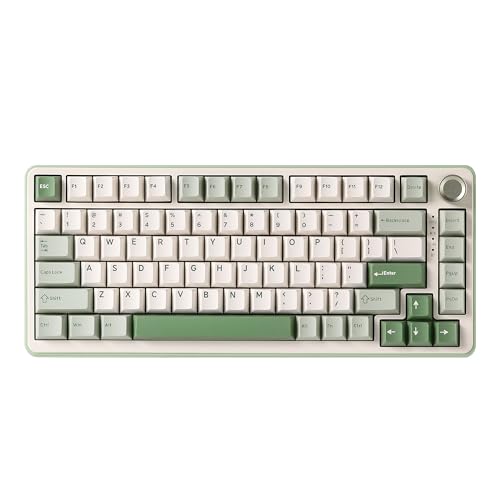
The YUNZII B75 PRO brings a refreshing, nature-inspired look to the desk with its Matcha Green aesthetic. What really sets it apart in daily use is the south-facing RGB LEDs. Most budget boards use north-facing LEDs, which can cause interference with certain high-end keycaps, but the south-facing orientation here ensures a beautiful glow and total compatibility with any aftermarket keycap sets you might want to try. The Milk switches provide a linear, buttery travel that feels incredibly smooth right out of the box.
This board is a dream for the aesthetic-focused gamer or the creative professional. If you care about “deskmat matching” and want a keyboard that looks like a piece of art while still performing at a high level, this is it. The gasket mount structure ensures that it doesn’t just look good; it sounds dampened and premium.
One honest trade-off is the knob’s dual-mode logic. You have to long-press it to switch between volume and brightness control. In the heat of a game, if you just want to quickly dim the lights or crank the volume, that five-second delay can feel like an eternity. It’s a small UI quirk that takes some getting used to.
Womier DK75 75% Wireless Gaming Keyboard, RGB Backlit Creamy Keyboard with Media Knob, OLED Screen, Tri-Mode 2.4GHz/USB-C/BT5.0, Anti-Ghosting No-Conflict Silent Membrane Keyboard for MAC Windows
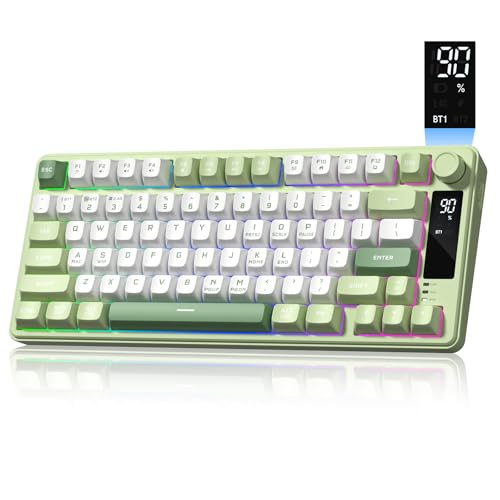
The Womier DK75 takes a very different path than the others, featuring a silent membrane switch structure inside a mechanical-style body. What makes it stand out is the inclusion of a Smart OLED screen alongside the rotary knob. Being able to glance down and see your exact battery percentage or connection status without opening a software menu is a massive convenience that even many $200 keyboards lack. The PBT keycaps are high quality, ensuring the legends don’t fade even with heavy use.
This is the best choice for someone who loves the 75% layout and the “gamer” look but absolutely needs a quiet keyboard. If you work in a quiet library or share a bedroom, the cushioned membrane strokes are virtually silent compared to traditional mechanical switches. It’s also great for those who prefer a softer, “mushy” feel over a sharp mechanical click.
The obvious trade-off is that it isn’t a true mechanical keyboard. You lose the ability to swap out switches, and you won’t get that crisp, tactile “pop” that mechanical enthusiasts crave. If you’re looking for the traditional mechanical typing experience, the DK75 will likely feel too soft for your tastes.
RK ROYAL KLUDGE R75 Wireless Mechanical Keyboard, 75% Percent Custom Gaming Keyboard Gasket Mount RGB Backlit with Knob & PBT Keycaps, BT5.1/2.4GHz/USB-C, Hot Swappable Cream Switch, White

The RK ROYAL KLUDGE R75 is a powerhouse of features, particularly the CNC metal volume knob. Unlike plastic knobs that can feel wobbly, this one is sturdy and even hot-swappable itself. What makes this board shine in real life is the Hot-Swappable Cream Switches. They offer a very specific, “marbly” sound profile that is highly sought after in the hobby. Combined with the gasket mount and five layers of sound-absorbing material, it delivers a high-end typing experience at a mid-range price point.
This is a great pick for the “power user” who multitasks across multiple systems. With BT5.1, 2.4GHz, and USB-C, it handles device switching better than most. If you have a work laptop, a gaming PC, and a tablet all on one desk, the R75 acts as a perfect central hub.
One thing to watch out for is the battery life with RGB on. While it has a 4000mAh battery, those 20+ RGB modes are quite power-hungry. If you like your keyboard at max brightness, you’ll find yourself reaching for the charging cable much sooner than the advertised seven days. Turning the lights off extends it significantly, but then you lose the visual flair.
RK ROYAL KLUDGE R75 Mechanical Keyboard Wired with Volume Knob, 75% Keyboard Gasket Mounted, Hot Swappable, Creamy Sound, MDA Profile, PBT Keycaps

The wired version of the RK ROYAL KLUDGE R75 is a focused, no-nonsense tool for those who prioritize stability over wireless freedom. What makes it stand out is the use of Silver Pro switches. These have a shorter actuation distance than standard switches, meaning they register your press faster—a massive advantage in competitive gaming. The MDA profile keycaps are another highlight; they have a wider, dished top that “hugs” your fingertips, which I find much more comfortable for long-form typing than the standard OEM profile.
I’d recommend this to the dedicated PC gamer who doesn’t want to deal with charging batteries or wireless latency. It’s a “desk-bound” professional tool. The gasket mount ensures that despite being a gaming-first board, it doesn’t have that hollow, pingy sound that usually plagues mass-produced “gaming” peripherals.
The trade-off is the lack of wireless. In an era where almost everything is tri-mode, being tethered to a cable might feel restrictive if you like a clean, minimal desk setup. You are trading convenience for raw performance and a slightly lower price point, so make sure you’re okay with that permanent cable before committing.
MageGee 75% Mechanical Gaming Keyboard, Red Switch, LED Blue Backlit, 87 Keys Compact TKL Wired Computer Keyboards for Windows Laptop PC Gamer – Black/Grey

The MageGee 75% is the “old school” contender of the group. What makes it stand out is its rugged, metal panel construction and simplicity. Unlike the complex gasket-mounted boards, this uses a more traditional tray mount with Mechanical Red Switches. It feels incredibly stiff and responsive, which some gamers actually prefer over the “bouncy” feel of modern gasket boards. It also comes with extra red keycaps, allowing for a bit of instant customization right out of the box without spending extra money.
This is the best choice for the budget-conscious gamer or someone buying their first mechanical keyboard. It’s a “workhorse” board. If you need something durable that can survive a few spills (thanks to the splash-proof design) and don’t care about wireless modes or “creamy” acoustics, this is a very reliable, affordable entry point.
However, the blue-only LED backlight is a significant limitation in a world of full RGB. You can’t change the color to match your setup; you’re stuck with that specific shade of blue. Additionally, because it lacks the internal foam layers found in the newer “thocky” boards, the typing sound is much louder and more “clackys,” which might be too noisy for an office environment.
RedThunder K75 Wireless Mechanical Gaming Keyboard, 75% Hot Swappable Creamy Keyboard with Knob, RGB Backlit, Pre-lubed Linear Switches, Side Printed PBT Keycaps, Wireless/Wired/BT5.0 Connection Mode

The RedThunder K75 grabs your attention immediately with its side-printed translucent PBT keycaps. When the RGB lighting hits those side legends, the effect is stunning—it creates a “floating” look that is very easy to read in the dark while keeping the top of the keys clean. In real life, the pre-lubed coconut switches (a unique linear option) provide a surprisingly smooth travel that rivals more famous brands. It feels like a boutique custom board but at a fraction of the cost.
This is a great option for gamers who play in low-light environments and want a board that looks “stealthy” until the lights come on. The 75% portable layout and triple-mode connectivity make it a versatile companion for someone who moves between a home setup and a gaming cafe or friend’s house.
One honest downside is that it’s not beginner-friendly. The side-printed legends can be confusing if you aren’t used to them, and the manufacturer even notes that they don’t recommend it for first-time mechanical users. If you still hunt-and-peck for symbols or numbers, the learning curve on this specific keycap style will be frustratingly steep.
YUNZII C75 Wireless Mechanical Keyboard,75% Layout, Hot-Swappable NKRO,BT5.0/2.4G/USB-C Mode,Dye-Sub PBT MOA Keycaps,RGB Gasket Mount,Cute Cake Design for Mac/Win/Gaming (Purple, Candy Switch)
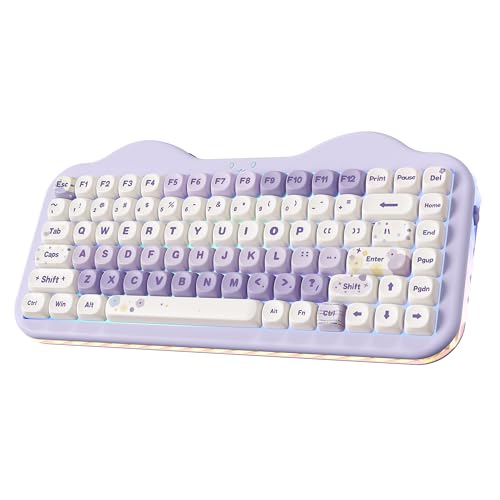
The YUNZII C75 stands out instantly for its “Cute Cake” design and MOA profile keycaps. These keycaps are much rounder and more uniform than standard ones, giving the board a soft, marshmallow-like appearance. But don’t let the “cute” look fool you; inside is a high-performance gasket mount system and a massive 5500mAh battery. This is the largest battery in the group, meaning you can actually leave the RGB on for a long time without worrying about it dying mid-session.
This is the perfect gift or personal purchase for someone who wants a “kawaii” or highly stylized desk setup without sacrificing typing quality. The Candy switches are pre-lubed and provide that deep, thocky sound that enthusiasts love. It’s a rare blend of “toy-like” aesthetics and professional-grade internals.
The trade-off is the MOA profile keycaps themselves. Because they are uniform and don’t have the typical sculpted height of Cherry or OEM profiles, they can feel a bit strange at first. Your fingers might slip between keys more easily until you build up the muscle memory for the flatter, rounder surface. It’s definitely a “love it or hate it” typing experience.
Product prices and availability are accurate as of the date/time indicated and are subject to change. Any price and availability information displayed on Amazon.com at the time of purchase will apply to the purchase of this product.
Buying Guide
FAQs
What is the difference between the AULA F75 Pro and the standard AULA F75?
The primary difference is the inclusion of a multi-function control knob on the F75 Pro, which allows for quick adjustments of volume and RGB lighting. Both models share the same core features like tri-mode connectivity, a 4000mAh battery, and a gasket mount structure with five layers of sound-dampening foam.
Are these keyboards good for gaming?
Yes, many of these keyboards are explicitly designed for gaming with features like N-key rollover, anti-ghosting, and a WIN key lock to prevent accidental interruptions. Models like the AULA F75 Pro and RK R75 offer fast, responsive switches and programmable keys to enhance your gaming performance.
What does ‘hot-swappable’ mean and why is it important?
‘Hot-swappable’ means you can change the switches on your keyboard without any soldering, allowing for easy customization of the typing feel and sound. This feature is perfect for users who want to experiment with different switch types (linear, tactile, or clicky) to find their perfect preference.
Can I use these keyboards with multiple devices?
Most of the keyboards featured offer tri-mode connectivity (Bluetooth, 2.4GHz wireless, and USB-C wired), allowing you to connect and switch between multiple devices seamlessly. Some models, like the AULA F75 and YUNZII C75, can connect to up to five devices simultaneously.
What makes the ‘thocky’ or ‘creamy’ sound in some of these keyboards?
This desirable sound profile is achieved through a combination of a gasket mount design, which allows the internal plate to flex slightly, and multiple layers of sound-dampening materials like Poron foam, IXPE pads, and silicone. Pre-lubricated switches and stabilizers also contribute to a smoother, quieter typing experience.
Is a wired or wireless keyboard better for me?
Wireless keyboards offer a cleaner, more flexible setup and are ideal for those who value portability and a minimal desk. However, a wired connection provides the most stable, lag-free connection, which is often preferred by competitive gamers. Many models in this list offer the best of both worlds with tri-mode connectivity.
What is a gasket mount keyboard?
A gasket mount keyboard uses rubber or silicone gaskets to mount the internal plate to the case, rather than screwing it in directly. This design creates a softer, more flexible typing experience and helps to dampen the sound of each keystroke, resulting in a deeper, more pleasing ‘thock’.
Which keyboard has the best battery life?
The YUNZII C75 stands out with its massive 5500mAh battery, offering exceptional endurance for extended wireless use. Most other models, like the AULA F75 and RK R75, come with a still-impressive 4000mAh battery that can last for days on a single charge.